


AD
If you've spent a while looking for proper setups for iRacing, LMU or ACC, chances are you've already come across GOSetups. And if not, now's the time. The platform has been building a reputation as one of the most serious references in simracing for those who want to go beyond default setups, and now it also includes GO Fast, its own telemetry and overlay app that works like a genuine virtual race engineer.
We've dived headfirst into everything they offer, and here's the rundown.
Table of Contents
GOSetups: over 3,000 setups made by esports drivers
The first thing that stands out about GOSetups is the sheer volume. Over 3,000 setups available, updated weekly (more than 100 per week), and covered across several sims: iRacing, Le Mans Ultimate, Assetto Corsa Competizione, Automobilista 2, Assetto Corsa and F1 25. It's not a generic store where someone uploads a few random values, but setups developed by drivers who compete at esports level, which shows quite clearly once you try them on track.
Each setup is available in both dry and wet versions where relevant, and they're organised by car and category, so finding what you're after takes no more than a minute. They cover everything from GT3 for iRacing to LMP2 for LMU or the latest ACC cars. If you're looking for, say, a iRacing setup for the Ferrari 296 GT3 at Monza, it's right there ready to download.
GO Fast: the app that turns your data into real improvements
The other big string to GOSetups' bow is GO Fast, a Windows application that goes well beyond a simple telemetry viewer. It works with iRacing, LMU, ACC, AC and AMS2, and packs a pretty powerful set of tools:
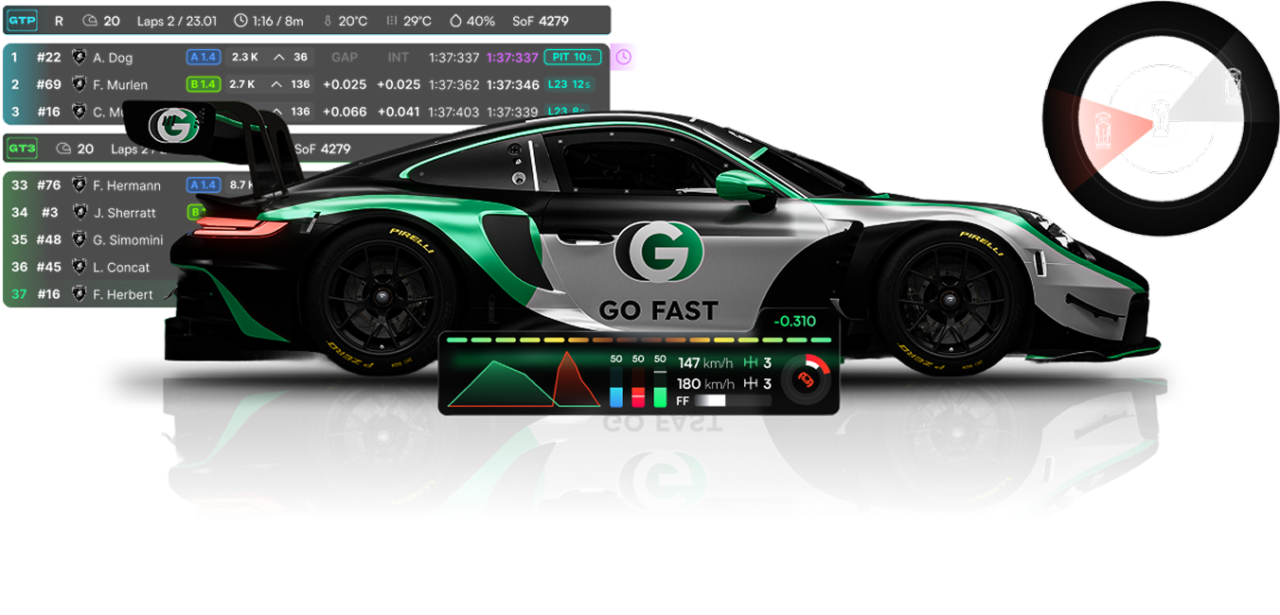
- Telemetry and line comparison: you can compare your lap against a pro lap or yourself from a previous session, with braking, speed and acceleration markers. Really useful for pinpointing exactly which corner is costing you time.
- Setup Optimiser: Answer a few questions about the car's handling (understeer, oversteer, instability when braking, etc.), and the app will suggest specific adjustments to correct the issue. No in-depth mechanical knowledge is required.
- Real-time overlays: standings, relative times, telemetry data, sector times… displayed directly on the screen while you race, compatible with iRacing, LMU, and ACC.
- Stint Tracking: fuel tracking, tyre pressures, a refuelling calculator and stint comparison. Really aimed at endurance or long-format races.
- Setup Auto-Installer: the setup installs straight into the sim without having to go hunting for folders. You jump into the session and it's already loaded.
If you already use an overlay app like Racelab, GO Fast will feel familiar on that front, though combining it with the Setup Optimiser and compared telemetry makes it considerably more complete for anyone looking to improve their lap times.
Pricing and how to get access
GO Fast has a free version that already includes basic telemetry, basic overlays, a leaderboard, a fuel calculator and a tyre pressure tool for ACC. Not bad at all for getting familiar with the platform without spending a thing.
The subscription Pro costs 12,09 £/month o 9,67 £/month if you pay annually (£116.01/year). With it you get full access to GO Fast (Setup Optimiser, full overlays, lap comparison against friends and leaderboards) plus access to the entire GOSetups library with 30 monthly setup downloads for ACC, LMU and AC, and unlimited downloads for iRacing and AMS2.
We've got a discount code for you: with the code outlaws you get 10% off your first subscription. It's single-use per account, so make the most of it whenever you decide to sign up.
You can access GOSetups and GO Fast from the link below:
Go to GOSetups and GO Fast
Have any thoughts?
Share your reaction or leave a quick response, we’d love to hear what you think!
-
 0
0
-
0
-
0
-
0
-
0
-
0